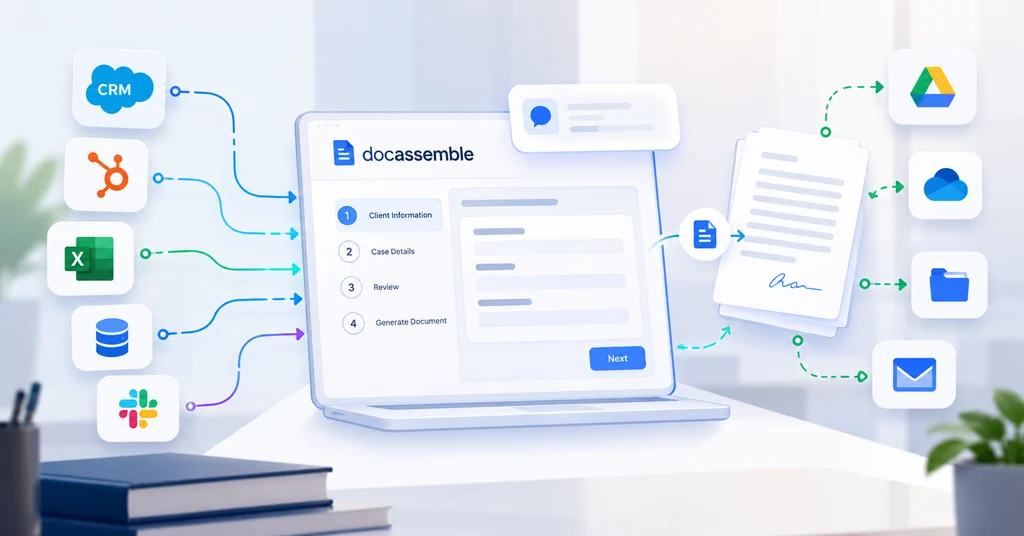
AI Summary: Docassemble API integration connects guided legal interviews and document generation with systems a legal team already uses. It can bring approved intake data into interviews, associate sessions with matters, and transfer generated documents to authorized destinations. A complete workflow may use the Docassemble REST API, the receiving application’s API, and custom middleware. Successful implementation requires clear data ownership, secure access, validation, legal review where needed, and recovery when a handoff fails.
What Is Docassemble API Integration?
Docassemble API integration allows external applications to interact with supported Docassemble functions through authenticated requests. It helps turn a standalone document interview into part of a broader legal workflow.
For a US law firm, that might mean reusing client information from intake, collecting matter-specific answers, and saving an approved document against the correct case.
A legal document automation API supplies technical capabilities. Your implementation still determines who can access information, when a document is ready, and what happens next.
Custom Docassemble development can connect these decisions with interview logic and existing operations.
Why Legal Workflow Automation Needs Connected Systems
Repeated data entry creates opportunities for inconsistent names, outdated addresses, and incorrect matter references. Manual downloads and uploads also make it difficult to see whether work reached its destination.
Connecting systems can reduce those handoffs, but success should be measured through completed workflows rather than API calls alone.
Hypothetical example: A legal aid organization receives an intake submission. An integration validates the information, associates it with a matter, and supplies approved values to an interview. The client answers remaining questions, a legal professional reviews the generated document, and the integration saves the approved version to the matter system.
The document is marked delivered only after the destination confirms receipt.
Explore additional Docassemble use cases to identify which workflow offers the clearest operational benefit.
Docassemble API Integration: A Practical Reference
| Workflow stage | Information or action | Essential control |
|---|---|---|
| Intake | Client details and matter reference | Validate source data |
| Interview setup | Mapped variables and session association | Enforce authorized access |
| Interview progress | Answers and required next steps | Respect interview logic |
| Document generation | Available attachment output | Confirm readiness and review |
| Delivery | Upload to the destination system | Confirm correct matter and receipt |
| Recovery | Retry or route failed work | Prevent duplicates and record outcomes |
This framework separates interview completion, legal approval, and document delivery. Treat them as distinct states rather than one “done” flag.
Docassemble Integration Services: Six Practical Use Cases
1. Docassemble CRM Integration
CRM integration can reuse contact information and associate an interview with an existing client record.
Define which application owns each field. For example, an interview may confirm a mailing address without automatically replacing the CRM’s authoritative address.
Return only the information the CRM needs, such as a completion milestone or document reference.
2. Docassemble Case Management Integration
Case management integration connects interview activity and approved outputs with the correct matter.
Use stable identifiers rather than matching only on client names. Confirm that the chosen system exposes the necessary API operations and that your subscription permits access.
Include a review path when a matter is closed, missing, or inaccessible.
3. Docassemble Document Management Integration
Document management integration can transfer generated outputs into an authorized repository.
Define filenames, folders, metadata, versioning, and replacement rules. A generated document should not appear as successfully stored until the upload is confirmed.
The Docassemble attachment documentation provides the starting point for understanding document generation; destination storage requires its own implementation.
4. E-Signature Workflow Connections
An integration can send an approved output to a signature service, associate signers, track the signing process, and return completed copies.
These operations depend on the signature provider’s API and configuration. Keep “ready for signature,” “sent,” and “signed” separate.
Assign ownership for expired requests, declined signatures, and corrected documents.
5. Client Portals and Existing Forms
A portal can start an interview journey, reuse approved information, and give users a controlled way to continue incomplete work.
Avoid asking clients to repeat information without a reason. Equally, do not assume every stored answer remains accurate.
Review how resume links and session access work before distributing them through email or a portal.
6. Billing, Notifications, and Reporting
Defined milestones can trigger a billing review, a staff notification, or an operational report.
Keep notifications minimal: a matter reference and required next action may be enough. Sensitive interview answers and complete documents generally do not belong in routine analytics.
Review relevant Docassemble solutions against these operational requirements.
How the Docassemble REST API Fits the Architecture
Authenticate and Map Information
The official Docassemble API documentation describes API-key authentication and supported operations. It recommends supplying keys in headers rather than URL parameters, which may be logged.
API requests operate with the key owner’s identity and permissions. Choose credentials carefully and keep them on the backend.
Map source fields to expected interview variables, validate formats, and retain the identifiers needed to associate work with the correct matter.
Manage Sessions and Document Readiness
The integration must track the intended interview and session. Setting variables should not be treated as proof that all interview logic has run or attachments are ready.
Use documented operations and explicit application rules to determine progress and retrieve available outputs. Confirm endpoint behavior against the deployed version.
Choose direct integration for a focused connection, or middleware when several systems need mapping, queues, and recovery. Custom callbacks or scheduled checks may be appropriate; do not assume every milestone has a built-in webhook.
How to Connect Docassemble with Existing Systems
Step 1: Map the Workflow
Document users, source systems, interview steps, approval points, and destinations. Include exceptions such as incomplete intake or missing matter records.
Step 2: Confirm Access and Data Ownership
Validate API availability on both sides. Create a field map that distinguishes required inputs, optional information, and fields that must never be overwritten automatically.
Step 3: Build and Test the Complete Journey
Implement the connection, interview changes, document delivery, and operational records.
Test missing data, interrupted sessions, revoked credentials, destination outages, duplicate requests, and incorrect matter identifiers. Successful document generation alone is not sufficient acceptance evidence.
Step 4: Launch With Support Ownership
Define alerts, recovery procedures, and responsibility for failures. Document how staff can identify incomplete transfers without accessing unnecessary confidential information.
Docassemble development services should specify these deliverables alongside implementation work.
Security and Confidentiality for US Legal Teams
Follow Docassemble’s security guidance and assess your actual configuration. It highlights HTTPS, production hardening, session-link risks, and important differences in how interview answers and documents are stored.
Do not assume all stored information receives identical encryption protections. Review document storage, backups, hosting controls, and any external destinations separately.
Restrict access, minimize transferred data, redact diagnostic logs, and define retention and deletion procedures. Have the appropriate legal and security owners assess professional obligations and vendor arrangements.
Teams across different industries may need different controls. Technical connectivity alone does not establish compliance.
Costs and Choosing an Integration Partner
Costs depend on system count, interview complexity, data mapping, authentication, document routing, testing, and support.
Request separate estimates for discovery, interview changes, connector development, deployment, third-party charges, and maintenance. A project-specific scope is more useful than an unsupported universal price.
Before you hire a Docassemble developer, ask for relevant integration examples, failure-recovery demonstrations, source ownership terms, and handover documentation.
If your existing workflow is unclear, a free Docassemble audit can provide a starting point for discussing gaps and priorities.
Frequently Asked Questions
1. Can Docassemble connect with our existing CRM?
Yes, where the CRM provides suitable API access. The implementation needs field mapping, authentication, permissions, and rules governing updates to client records.
2. Can we prefill interviews with existing client data?
Supported integration methods can supply interview variables. Validate the values and allow users to confirm important information rather than assuming historical records are current.
3. Can generated documents be saved automatically?
Yes, with a suitable destination API and delivery workflow. Confirm document readiness, correct matter association, permissions, and successful upload before marking delivery complete.
4. Does integration always require middleware?
No. A focused connection may work directly. Middleware becomes useful when several systems require transformations, queues, coordinated updates, or recovery.
5. How do we protect confidential legal information?
Use secure connections, restricted credentials, carefully configured storage, minimal data sharing, and redacted logs. Review session access, retention, backups, and third-party responsibilities.
 English