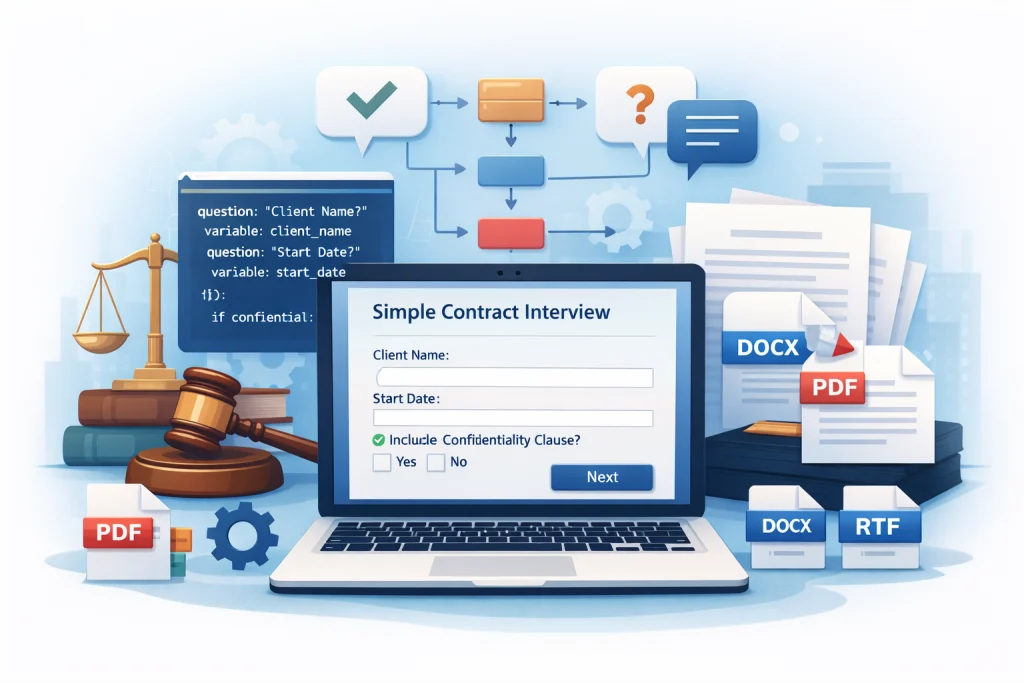
Step-by-Step Guide: Building Your First Docassemble Interview for a Simple Contract
Legal document creation doesn’t have to be slow, repetitive, or error-prone anymore. With modern legal technology, even complex contracts can be generated dynamically using structured user input. One of the most powerful tools enabling this transformation is Docassemble.In this guide, we’ll walk you through a step-by-step, beginner-friendly approach to creating your very first Docassemble interview for a simple contract. Whether you’re a lawyer, legal technologist, or founder building a legal automation product, this docassemble interview tutorial will help you understand both the why and the how—without overwhelming jargon. Why Docassemble Is a Game-Changer for Legal Automation Docassemble is an open-source platform designed specifically for legal document automation. Instead of filling out static Word files or PDFs, users answer interactive questions, and documents are generated automatically in formats like PDF, DOCX, or RTF. What makes Docassemble powerful is its flexibility: This makes Docassemble legal document automation ideal for contracts, agreements, forms, and guided legal workflows. What Is a Docassemble Interview? A Docassemble interview is a structured question flow written in YAML. Based on user responses, Docassemble decides: In simple terms, you’re designing a smart conversation that produces a legally valid document. This guide focuses on creating a Docassemble simple contract template, such as: Step 1: Define the Contract Scope First (Before Writing Code) Before touching YAML, clarify what your contract needs. For a simple contract, define: This clarity helps you design a clean Docassemble question flow and avoids over-engineering. Step 2: Understand the Basics of a Docassemble YAML Interview Every Docassemble YAML interview follows a predictable structure: A minimal YAML interview looks like this conceptually: This simplicity is why learning how to build Docassemble interview logic is approachable even for non-developers. Step 3: Create Your First Question Block Start by asking for basic information. For example: Each answer becomes a variable that Docassemble remembers. This is the foundation of every Docassemble interview example—clear questions, clear variable naming, and logical flow. Human-friendly questions matter. Avoid legal jargon where possible and explain terms briefly if needed. Step 4: Add Conditional Logic for Smarter Interviews This is where Docassemble shines. Let’s say your contract includes an optional confidentiality clause. You can: This conditional approach makes Docassemble contract automation far more powerful than static templates. Step 5: Build the Document Template Once questions and logic are in place, it’s time for Docassemble document generation. Docassemble supports: Inside your document template: This step transforms raw data into a legally presentable document—one of the biggest advantages of legal document automation with Docassemble. Step 6: Test the Interview Like a Real User Testing is often skipped—and that’s a mistake. Run through the interview as: This helps ensure: Iterative testing improves both usability and legal accuracy. Step 7: Deploy and Iterate Once your interview works locally, you can: Over time, you can enhance: This is how Docassemble legal document automation scales from a simple contract to a full legal platform. Common Mistakes Beginners Should Avoid From experience, here are a few pitfalls: A good docassemble interview tutorial focuses as much on user experience as on technical correctness. Why Businesses and Legal Teams Choose Docassemble Docassemble isn’t just a tool—it’s a framework. Teams adopt it for: Whether you’re automating one contract or building a full legal SaaS, Docassemble provides the foundation. Final Thoughts Building your first Docassemble interview may feel intimidating at first—but once you understand the structure, it becomes a powerful way to transform legal workflows. With thoughtful question design, clean YAML logic, and smart document templates, Docassemble enables scalable, reliable legal automation. This guide should give you a strong foundation to start building confidently—and improving with every interview you create. FAQs 1. Is Docassemble suitable for beginners with no coding background? Yes. While Docassemble uses YAML, it’s very readable and beginner-friendly. Many legal professionals learn it without prior programming experience, especially when following a structured docassemble interview tutorial. 2. What type of contracts can I automate with Docassemble? You can automate NDAs, service agreements, employment contracts, lease agreements, and more. A Docassemble simple contract template is usually the best place to start before moving to complex documents. 3. How long does it take to build a basic Docassemble interview? A simple interview can be built in a few hours. More advanced Docassemble contract automation workflows with conditional clauses and integrations may take several days. 4. Can Docassemble generate Word and PDF files? Yes. Docassemble document generation supports DOCX, PDF, and RTF formats, making it suitable for most legal and business needs. 5. Is Docassemble secure for handling legal data? Docassemble is open-source and can be self-hosted, giving organizations full control over data security, compliance, and access management.
Step-by-Step Guide: Building Your First Docassemble Interview for a Simple Contract Read More »



 English